

Microsoft Patches Actively Exploited Windows Zero-Day in November Security Update
Microsoft’s latest November Patch Tuesday rollout includes fixes for multiple high-severity vulnerabilities — including one zero-day that attackers are actively exploiting to take control of Windows systems.
This month’s patches are critical for Windows 10, Windows 11, Windows Server, Microsoft Office, and several related services. Skipping this update could leave your system vulnerable to malware, data theft, or full administrative takeover.
🧩 What’s Been Fixed
Every second Tuesday of the month, Microsoft releases a new wave of security fixes — known as Patch Tuesday. November’s batch targets a range of serious vulnerabilities, most notably:
1. CVE-2025-62215 — Windows Kernel Elevation of Privilege (Zero-Day)
This zero-day vulnerability has already been exploited in the wild. It’s an Elevation of Privilege (EoP) flaw in the Windows Kernel that allows attackers to gain administrator-level permissions on a compromised system.
The bug stems from a race condition — a timing issue where multiple processes try to access the same resource simultaneously. By exploiting that brief moment of confusion, attackers can execute code with higher privileges, effectively taking full control of the device.
Attackers typically chain this flaw with other exploits to move from limited user access to full system admin rights.

Stop Spam Before It Hits Your Inbox: How to Use
Stop spam! 🦆 Learn to use DuckDuckGo Email Protection to block trackers and hide…
Top 30 Most Common Passwords 2025: Is Yours on This
Most common passwords 2025 revealed—123456 still #1. Goinsta Repairs shows you how to stay…

High-Severity Chrome Vulnerability Exposed AI Assistant to Hijacking – What
CVE-2026-0628: Gemini flaw let malicious extensions hijack AI assistant, access cameras, microphones & files….

Are Browser Extensions Safe? What You Need to Know Before
Are browser extensions safe? Learn the biggest security risks, warning signs, and how GoInsta…

Don’t Take the Bait: Your Complete Guide to Phishing Protection
Protect your family from phishing scams with simple email safety checks, what to do…

Locked Out? How to Protect Yourself from Ransomware and Sextortion
Cyber extortion happens when hackers break into your devices or network, then threaten to…
2. CVE-2025-60724 — Microsoft Graphics Component (GDI+) Remote Code Execution
This critical Remote Code Execution (RCE) bug carries a CVSS score of 9.8 out of 10, meaning it’s extremely dangerous. It’s a heap-based buffer overflow vulnerability in the GDI+ graphics component used by Windows and Microsoft Office.
An attacker can trigger this flaw by convincing someone to open a malicious file or document — such as a booby-trapped image or metafile. More advanced attackers could exploit it remotely by uploading a crafted file to a vulnerable web service.
If successful, they can run arbitrary code on the target system, install malware, steal information, or use the compromised machine to spread further attacks.
🛠️ How to Apply the Updates and Protect Your System
Here’s how to make sure you’re protected with the latest November 2025 security updates:
1. Open Settings
- Click the Start button (Windows logo).
- Select Settings (gear icon).
2. Go to Windows Update
- In Settings, click Windows Update on the left sidebar.
3. Check for Updates
- Click Check for updates.Windows will search for the latest November Patch Tuesday fixes.
4. Download and Install
- If updates are available, they’ll download automatically.
- Once ready, click Install (or Restart now) to apply them.A system restart is usually required.
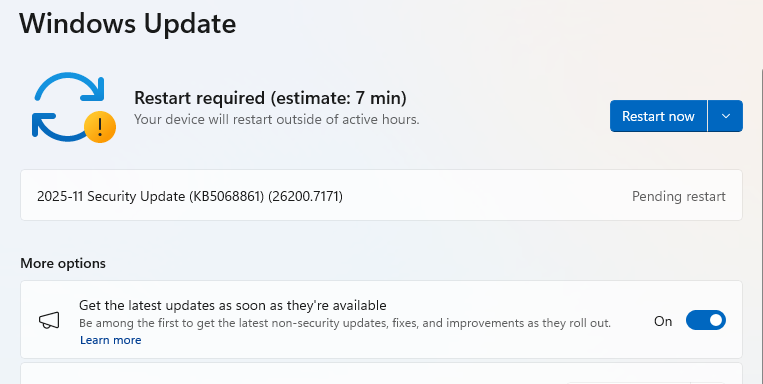
5. Double-Check You’re Up to Date
- After restarting, go back to Windows Update.
- If it says You’re up to date, you’re protected.
🔐 Why It Matters
Zero-day exploits give attackers an advantage — they can strike before defenders even know a flaw exists. That’s why installing updates promptly is one of the simplest yet most effective ways to secure your system.
With attackers already exploiting CVE-2025-62215, it’s critical for all Windows users — home and enterprise alike — to patch as soon as possible.
✅ Bottom Line
Don’t wait.
Run Windows Update today, restart your PC, and make sure you’re fully patched.
These fixes close dangerous loopholes that hackers are actively targeting right now.
Usually I do not read article on blogs however I would like to say that this writeup very compelled me to take a look at and do so Your writing taste has been amazed me Thanks quite nice post